
19/10/2026 11:02
Can Shoppers Understand Your Product Photos? A TikTok Alt-Text Workflow for Cambodian Shops

A product photo can show a removable lid, a narrow opening or a useful handle without explaining any of those details in words. For someone using a screen reader, that missing description can make a shop’s post difficult to understand. Before spending time or money promoting it, make sure the product information survives without the picture. This article follows a hypothetical Cambodian homeware shop preparing a TikTok photo post about ceramic storage jars. The workflow covers choosing useful details, writing separate descriptions, checking the published experience and deciding whether an SMM service addresses the actual problem. The shop and all sample descriptions are illustrative, not customer evidence.
1. Define the question the pictures should answer
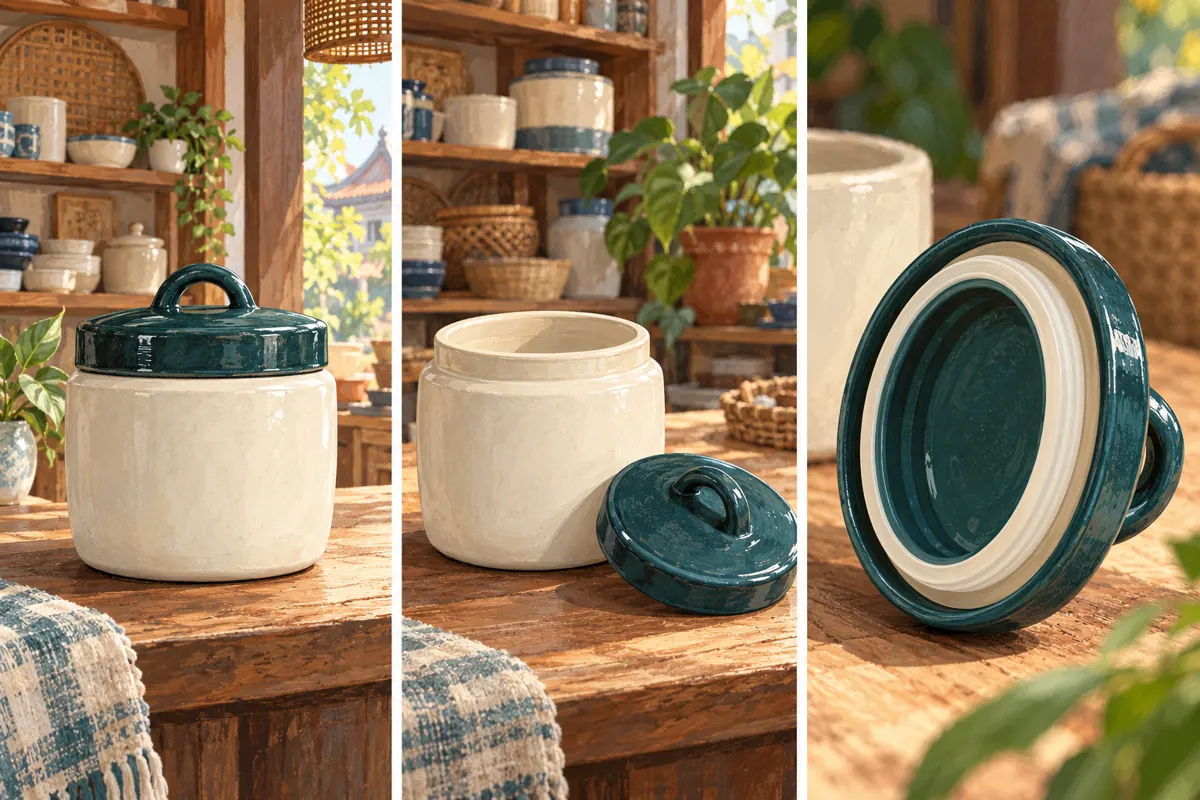
Start with a concrete shopping question: can someone understand how this jar opens and what its lid looks like underneath? That gives the post a purpose beyond displaying attractive stock. In the hypothetical Phnom Penh shop, staff select three views: the complete jar, the open jar and the underside of the lid. Each picture contributes information that the others cannot provide.
Write the intended takeaway before drafting descriptions. Here, it might be that the jar has a separate lift-off lid with a visible ring around its underside. Avoid extending that observation into an unsupported claim about airtightness, food safety or durability. A photograph does not establish those properties. Keep verified specifications in the product information, and make clear when customers should ask staff about suitability. This distinction prevents an accessibility improvement from accidentally becoming an exaggerated sales promise.
2. Give alt text and the post caption different jobs
TikTok’s official accessibility announcement says creators can add alternative text to photo posts during upload or after publication. It describes the feature as a way for people using screen readers to hear what an image contains. Use that capability to communicate meaningful visual details. The ordinary post caption can explain the offer, available options and next step for an enquiry.
For this hypothetical shop, the caption could explain that customers should send the product reference when asking about availability. The first image description would explain the jar’s appearance. Repeating the whole sales caption beneath every picture makes the listening experience unnecessarily long. Equally, putting important ordering conditions only inside a graphic leaves them difficult to find. Keep essential purchasing information in ordinary text and use each image’s description to explain what that particular view adds.
3. Make a small description sheet before uploading
Create one working entry per selected photograph. Record a recognizable filename, its intended position, the visible feature and the proposed description. Add a short note for facts requiring verification. For example, a lid photograph may clearly show a pale ring, but the photograph alone may not establish the ring’s material. Ask the person responsible for product information before calling it silicone.
Keep the photo and its description together throughout editing. If the close-up becomes the opening image, move its description with it. Do another comparison after cropping: a description mentioning a handle becomes inaccurate if the final crop removes that handle. This small sheet also helps a second staff member review the post without guessing which draft belongs to which picture. It need not contain customer information, account passwords or payment records; the product images and approved wording are enough.
4. Describe the feature that matters in each view
For the hypothetical first photograph, a useful draft is: “Cream ceramic storage jar with a dark teal lift-off lid and a loop handle, standing on a wooden counter.” For the second: “The same jar open, with its lid resting beside it so the opening and empty interior are visible.” For the third: “Underside of the teal lid, showing a pale ring around the inner edge.” These examples describe three different contributions.
Begin with the object and its meaningful condition. Include colour when it distinguishes an option, and position when it explains a relationship. Skip decorative background details unless they affect understanding. “Beautiful premium jar for every modern home” expresses sales language but says little about the image. Likewise, “product photo” is too general. The listener should be able to identify what changed between views without hearing an inventory of every shelf, shadow and prop.
5. Handle Khmer, product references and image text carefully
Although this article is in English, the shop should write customer-facing descriptions in the language its intended audience understands. For a Khmer-language post, ask a fluent Khmer reviewer to check meaning and natural phrasing. Keep genuine product references consistent with the caption and stock record. Avoid switching languages repeatedly merely to include fashionable marketing terms.
If an image contains a meaningful label, carry the relevant information into accessible text. A picture marked with a product reference should not be described only as “a jar on a table.” However, avoid turning alt text into a long catalogue of prices, conditions and contact instructions. Those belong in the main product explanation too. Listen to unfamiliar model codes and abbreviations during review: a sequence that is obvious to staff on paper may sound confusing when spoken. Never assume Khmer pronunciation or language switching works identically on every device.
6. Add the descriptions and verify their associations
Prepare the photo post in the TikTok app and look for the alternative-text control in the posting options available to your account. Use TikTok’s current in-app help if the labels or location differ. Enter the matching description for each photograph, then revisit the sequence before publishing. Do not assume a single description has explained all the images.
If the control is unavailable in the interface you are using, keep the approved descriptions and provide a concise description of the essential visual information in the ordinary caption as an interim measure. That does not establish that the post offers the same experience as properly associated alt text. Record the limitation and check the supported options again. Also complete the applicable commercial-content disclosure: TikTok’s Community Guidelines say posts promoting a product, brand or business must use its content disclosure setting. Accessibility preparation does not replace that requirement.
7. Run a listening check on the actual post
A useful first check happens before publishing: ask a colleague to hear the descriptions without looking at the photographs. Can they explain which view shows the opening and which shows the lid’s underside? This catches vague writing, but it does not test the app. After publishing, review the actual post with a screen reader on a device your team can use confidently.
Check whether the descriptions are encountered, whether they correspond to the correct images and whether repeated wording makes navigation tiring. Note the device, app context and any problem you observed. One successful check is evidence about that experience, not proof that every device or language setup works perfectly. If possible, invite a regular screen-reader user to give voluntary feedback and compensate substantial testing work. Ask about the task they could or could not complete, rather than asking them to approve the post in general.

8. Decide whether an SMM service solves this problem
The supplied public catalogue includes “TikTok Random Comments | Arabic 🇸🇦 | Instant Start”. Its title presents it as an Arabic random-comment service; the supplied description is empty. That gives no evidence that it writes image descriptions, reviews Khmer accessibility or helps someone understand a lid. The appropriate decision for this task is to reject the mismatch, rather than select a service merely because it mentions TikTok.
Treat wording in a service title as catalogue wording, not independent verification of delivery or audience characteristics. Purchased engagement is not evidence of genuine interest, sales, ad delivery or Cambodian users. TikTok’s Community Guidelines also prohibit trading services that artificially boost engagement or manipulate its recommendation system. A practical promotion budget can instead support original photography, accurate translation and accessibility review. None of those activities guarantees reach, but each can address a specific information problem that comment volume cannot resolve.
9. Correct the gaps without rewriting everything
Suppose a reviewer says the second description never explains that the lid is separate. Amend that description and check it again; there is no need to replace every sentence in the post. TikTok’s accessibility announcement supports adding alt text after publication, so review the editing options on the existing photo post. Confirm that the saved result contains the correction.
Prioritize older posts that customers still use to evaluate products. A frequently shared catalogue post with unexplained comparison images is a more useful starting point than an obsolete seasonal announcement. For each correction, record the post reference, changed image and remaining limitation. Avoid interpreting silence as success: customers may leave without reporting a barrier. A short invitation to request a clearer description can help, but it should supplement the initial work rather than make every shopper responsible for discovering missing information.
10. Review usefulness with evidence you can actually observe
Evaluate the workflow through concrete checks: each meaningful photograph has a matching description, visible product references are understandable, and the listening review identifies the intended differences. Keep any usability feedback separate from engagement totals. If someone says the description helped them locate the lid detail, record that narrow observation without turning it into a claim that accessibility increased sales.
Common mistakes include copying one sentence across every image, describing a feature that was cropped out, stuffing place names into descriptions and presenting an inferred material as a confirmed fact. Another mistake is declaring the work finished because the post received more views. Give one staff member responsibility for checking descriptions whenever images change. The repeatable habit is simple: choose the relevant visual information, describe it accurately, verify the association and listen to the result before expanding promotion.
Frequently asked questions
Should every photograph have the same description if it shows the same product?
Usually the useful information changes with the view. Identify the product consistently, then explain the new detail: open interior, separate lid or underside. If two photographs contribute nothing different, consider whether both are needed. Repetition should help orientation rather than force listeners through identical promotional wording.
Can the shop use automatically generated descriptions without checking them?
Treat any generated description available to you as a draft. Compare it with the actual photograph and verified product facts. A plausible sentence can still misidentify the material, overlook a label or describe a background object instead of the selling detail. Staff remain responsible for the final wording.
Does good alt text guarantee more TikTok views or Cambodian customers?
No. The purpose of this workflow is to make visual information understandable to people who use image descriptions. It does not establish a ranking advantage, audience location or buying intent. Review accessibility through actual usability checks and assess enquiries separately, without attributing every change to the descriptions.
What if the caption already explains the jar?
Read the caption alongside each image description and remove unnecessary duplication. Keep general product and ordering information in the caption. Use the individual descriptions for meaningful visual differences that the caption does not explain. A reader encountering the images sequentially should still understand why each view is included.
Can this workflow be applied to a video instead of a photo post?
The photo alt-text feature discussed here should not be assumed to describe video content. For a video, plan spoken explanations of important visual actions and review relevant captioning options separately. A demonstration that only says “do it like this” may need a clearer narration explaining the action itself.
Explore the current service catalogue, create an account, or ask a specific question through support tickets.
- TikTok Newsroom: Celebrating Global Accessibility Awareness: Building an Accessible and Inclusive TikTok
- TikTok Community Guidelines: Overview, Commercial Disclosure and Fake Engagement
Prepared with AI assistance. Illustrations explain the workflow and do not represent customer results.